
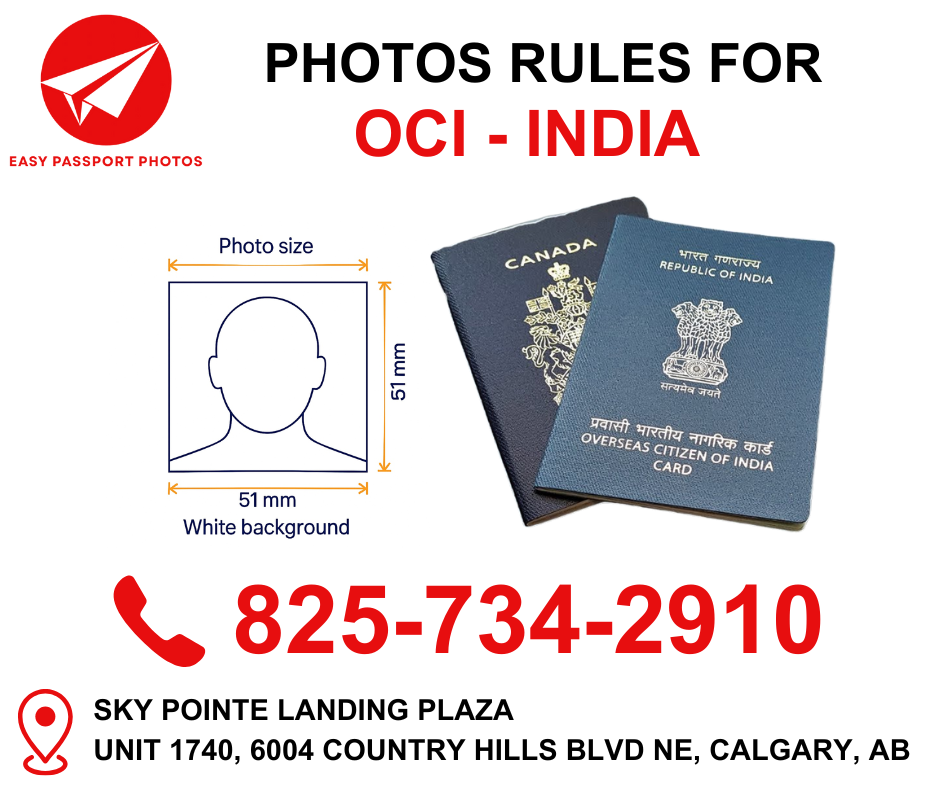
Applying for an Indian OCI (Overseas Citizen of India) card is a major step for individuals of Indian origin living abroad. While the application process is online, one of the most common reasons for delays or rejections is an incorrect photograph. OCI photo requirements are different from regular passport photos, and even small mistakes can cause your application to be put on hold.
This guide explains everything you need to know about Indian OCI photo requirements and how Easy Passport Photos helps applicants get it right the first time.
Why OCI Photo Requirements Are Strict
OCI cards are long-term identity documents linked to immigration records, visas, and travel history. The Government of India uses these photos for:
- Identity verification
- Digital records and biometric matching
- Immigration and visa processing
Because photos are uploaded and stored digitally, they must meet exact specifications. Any mismatch in size, background, or clarity can result in rejection.
Indian OCI Photo Size and Format
For OCI applications, you must upload two separate photos:
- Applicant photograph
- Signature or thumb impression (for minors)
Applicant Photo Requirements:
- Size: 2 inch x 2 inch (51 mm x 51 mm)
- Digital file size: 10 KB to 200 KB
- Format: JPEG / JPG only
- Color photo, high resolution
- Taken within the last 6 months
At Easy Passport Photos, we ensure both the physical dimensions and digital file size meet OCI portal standards.
Background and Lighting Rules
The background must be:
- Plain white or very light-colored
- Free from shadows, patterns, or objects
Lighting should be:
- Even across the face
- No glare, overexposure, or dark shadows
- Natural skin tone (no filters or edits)
Photos taken at home often fail due to uneven lighting, which is why many applicants rely on Easy Passport Photos for professional results.
Want to know Why Passport Photos Get Rejected – And How to Avoid It? Click Here
Facial Expression and Head Position
OCI photo rules require:
- Neutral expression
- Mouth closed
- Eyes open and clearly visible
- Head centered and facing straight toward the camera
- Entire face visible from chin to forehead
Smiling, tilting the head, or looking slightly away can lead to rejection.
Glasses, Head Coverings, and Accessories
Glasses:
- Generally not recommended
- If worn, must be non-tinted and glare-free
- Eyes must be fully visible
Head Coverings:
- Allowed only for religious reasons
- Full face must be visible
- No shadows caused by the covering
Accessories:
- No headphones, earbuds, or large jewelry
- Small studs are acceptable
- No uniforms or costumes
Want to read other Common Canadian Passport Photo Mistakes? Click Here
Clothing Guidelines for OCI Photos
What you wear matters more than many people realize:
- Avoid white clothing (it blends into the background)
- Choose solid, darker colors
- Avoid busy patterns or logos
- Wear everyday clothing (no uniforms)
At Easy Passport Photos, clients are guided on clothing choices before the photo is taken.
OCI Photos for Children and Infants
OCI applications for minors have slightly relaxed rules, but requirements still apply:
- No toys, pacifiers, or hands visible
- Child must be alone in the photo
- Neutral expression preferred (some flexibility for infants)
- White background required
Parents often struggle to capture a compliant photo at home. Easy Passport Photos specializes in infant and child OCI photos, making the process smooth and stress-free.
Common Reasons OCI Photos Get Rejected
- Incorrect size or file format
- File size outside the allowed KB range
- Shadows on face or background
- Poor lighting or low resolution
- Face not centered properly
- Glasses glare or covered eyes
- Background not fully white
Most of these issues are avoidable with professional assistance.
Digital Upload Tips for OCI Applications
When uploading your photo to the OCI portal:
- Ensure the file meets size limits before uploading
- Avoid screenshots or scanned photos
- Upload exactly as provided
Easy Passport Photos delivers OCI-ready digital files, eliminating guesswork.
Want to know why Choosing the Right Passport Photo Studio Matters? Click Here
Why Choose Easy Passport Photos for OCI Applications
At Easy Passport Photos, we understand the exact requirements of Indian OCI applications. Our services include:
- OCI-compliant photos guaranteed
- Proper sizing and file formatting
- Expertise in infant and minor photos
- Professional lighting and background
- Digital files ready for online upload
We don’t just take photos — we help you avoid application delays.
Final Thoughts
Indian OCI applications can be time-consuming, and photo rejection is one of the most frustrating setbacks. Understanding the rules and working with a professional studio can save weeks of delays.
With Easy Passport Photos, you can be confident that your Indian OCI photo meets all official requirements and is ready for submission the first time.
If you’re preparing your OCI application, start with a photo you can trust.
VISIT US:
📍 Sky Pointe Landing Plaza
Unit 1740, 6004 Country Hills Blvd NE, Calgary, AB
📞 Call us at: 825-734-2910
Tagged Acceptable Passport Photos, Canadian Passport Photos, Children Passport Photos, Indian Passport Photos, Infant Passport Photos, Instant Passport for Any Country, Newborn baby Passport Photos, Newborn baby Passport PhotosPassport Photos for Child Under 2, OCI photos, Passport Photo Studio Near Me, Passport Photos for Child Under 2